
Checking property ownership history in Ross County, Ohio is essential when buying a home, researching land records, verifying taxes, or handling legal matters. Many users struggle with the Ross County Auditor website due to confusing menus, missing parcel numbers, or uncertainty about which records are official.
This step-by-step guide explains exactly how to find accurate ownership history using the Ross County Auditor portal. By the end, you’ll know how to search by address or owner name, understand the ownership history table, identify red flags, and use the data safely for legal or financial purposes without guesswork or frustration.
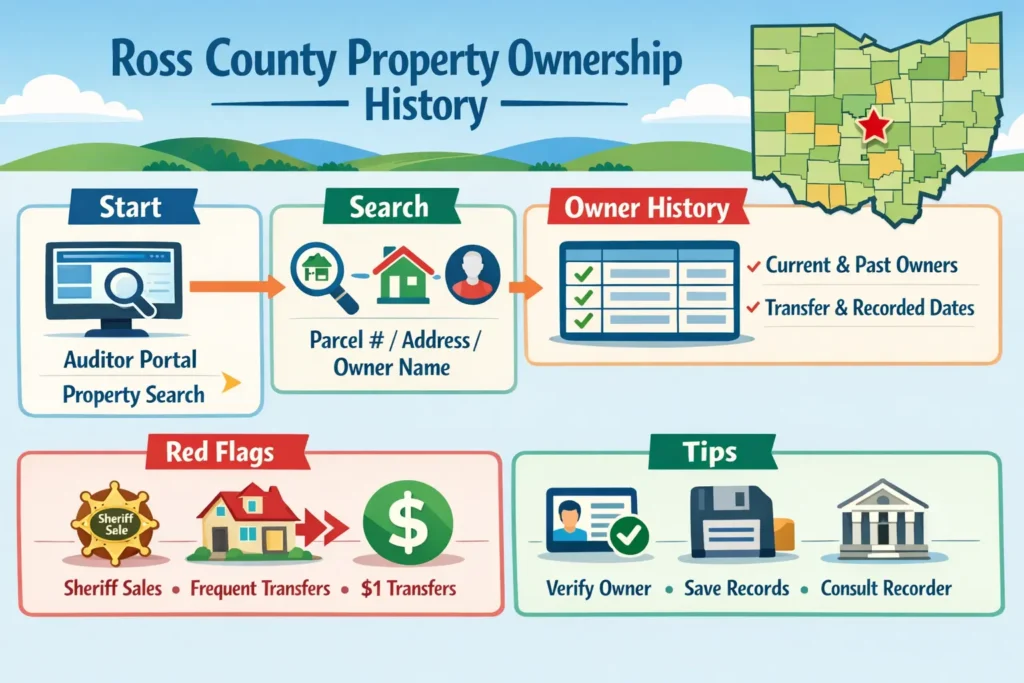
Navigating the Ross County Auditor Website
The Ross County Auditor website can feel overwhelming at first. The layout has multiple sections, and some menus are not immediately obvious. However, the site is view-only, meaning you cannot accidentally alter records.
To start, go to the Property Search page. You can search by street address, parcel number, or owner name. Address search is the simplest for most users. Enter the house number and street name, omitting apartment numbers if necessary. Partial addresses often work if the full address does not return results.
After selecting the correct property, you will see multiple sections: Owner Information, Property Details, Tax Data, and Ownership History. Scroll carefully to find the ownership table. This section lists current and past owners, along with transfer and recorded dates, instrument types, and sale prices. Understanding each column is key to interpreting property history accurately.
Searching Without a Parcel Number
Not knowing the parcel number is common. In such cases, the portal allows searches by owner name or street address. For owner name searches, try using only the last name. This will generate broader results, which can then be narrowed by city or street.
Address searches work best when numbers and street names are entered clearly. If the first search fails, remove additional details like unit numbers. Once you locate the property, the parcel number will be displayed, making future searches easier.
Understanding Official Ownership Records
Ownership history displayed on the Auditor portal is official and reliable for general research, tax verification, and preliminary legal use. Each record corresponds to a deed or transfer recorded with the county.
For legally binding copies of deeds, contact the Ross County Recorder’s Office. The Auditor portal summarizes ownership, but certified deeds are required for official filings. Using both sources ensures you have complete and accurate information for financial or legal decisions.
Red Flags in Ownership History
Common red flags in ownership history include:
- Multiple transfers within a short period
- Sheriff sales indicating foreclosure
- Bank or lender transfers after defaults
- $1 or $0 transfers often tied to family or estate changes
Why Ownership Changes
Ownership changes do not always indicate a sale. Common reasons include inheritance, divorce settlements, refinancing, estate transfers, or trust assignments.
Quitclaim deeds usually appear in family or estate arrangements, while warranty deeds represent standard sales. Recognizing these explanations prevents misinterpretation of the data. Each record in the table tells the story of how the property changed hands and why.
Reading Current vs Historical Ownership
The first row of the ownership table lists the current owner. All entries below represent past owners. The Transfer Date column shows when ownership legally changed, while the Recorded Date reflects when the county logged the transaction. A small discrepancy between the two is normal.
Understanding this distinction helps you identify who currently holds the property and what occurred historically. This clarity is essential when verifying ownership for legal or financial purposes.
Common Mistakes to Avoid
Users often make these errors:
- Entering nicknames instead of legal names.
- Using full mailing addresses with unit numbers.
- Assuming no result means no record exists.
- Stopping at the first page of results.
To avoid mistakes, use partial addresses, shorten input, scroll fully through the table, and try multiple search methods. Remember, the site is read-only and safe to explore.
Example Ownership Table
| Owner Name | Transfer Date | Recorded Date | Instrument Type | Sale Price |
|---|---|---|---|---|
| Michael Turner | 02/14/2023 | 02/17/2023 | Warranty Deed | $198,500 |
| Laura Bennett | 08/06/2018 | 08/09/2018 | Warranty Deed | $162,000 |
| Estate of Paul Reed | 01/22/2016 | 01/25/2016 | Estate Transfer | $0 |
| Ross County Sheriff | 11/03/2014 | 11/06/2014 | Sheriff Sale | $0 |
This table illustrates how ownership history is structured. Each column provides important details for interpreting transfers.
Checklist: Verifying Property Ownership
- Confirm the property matches your target address.
- Identify the current owner at the top of the table.
- Review historical entries for frequent transfers or red flags.
- Note sheriff sales or bank transfers.
- Check transfer and recorded dates for accuracy.
- Save or print the records for personal or legal use.
- Consult the Ross County Recorder for certified deeds if required.
Legal Considerations
Ownership records on the Auditor portal are official for general purposes but may not replace certified deeds. For court, tax disputes, or formal transactions, always verify with the Recorder’s Office.
Being aware of local property laws and mortgage requirements ensures you use the data correctly. Some lenders may require proof of ownership or updated records before approving transactions.
Conclusion
Checking property ownership history in Ross County is straightforward when you know the steps. The Auditor portal allows you to identify current and past owners, understand transfer patterns, spot potential risks, and verify legal records. Life events such as inheritance, divorce, or refinancing explain many transfers.
By learning how to read the table, using checklists, and consulting the Recorder when necessary, homeowners and researchers can navigate ownership history confidently. This approach saves time, prevents errors, and ensures you have accurate property information for financial, legal, or personal use.
FAQs
1. Can I trust the Auditor portal records?
Yes. They are official Ross County records and reliable for research, tax, and preliminary legal use.
2. How do I find a property without a parcel number?
Search by street address or owner name. Use partial information if necessary to generate results.
3. What do the dates in the ownership table mean?
Transfer Date is when ownership legally changed; Recorded Date is when the county logged it. Discrepancies of a few days are normal.
4. How can I identify red flags?
Look for frequent transfers, sheriff sales, nominal $1 transfers, or rapid bank assignments.
5. Do I need certified deeds for legal purposes?
Yes. Auditor portal records are summaries. For court or official filings, contact the Recorder’s Office.
6. Can non-tech-savvy users navigate the portal safely?
Absolutely. The site is read-only. Follow step-by-step instructions and avoid skipping sections.